A few months ago, I wrote about my search for the perfect multisampler / rompler. Back then, I also looked into the SamplerBox software. However, a few things bothered me when actually using it. So, with the help of AI, I’ve now vibecoded my own multisampler software for the Raspberry Pi Zero 2 W: Pirate Sampler.
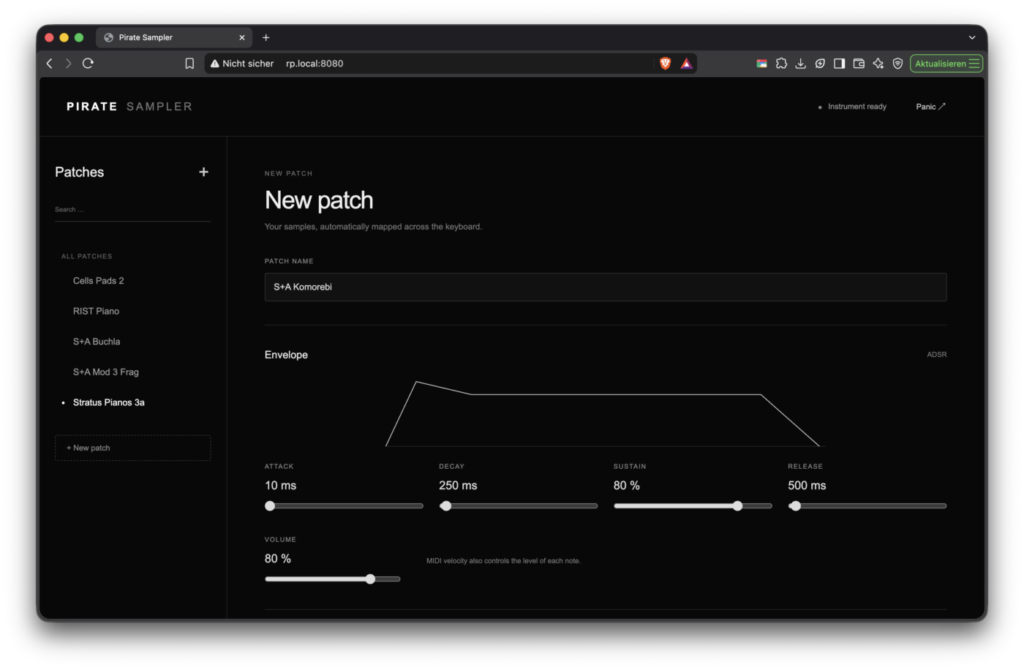
Unlike SamplerBox, Pirate Sampler offers a proper ADSR envelope. Parameters and samples can also be changed while the software is running, without having to restart it. New samples can be uploaded directly through a web interface instead of having to transfer them via FTP.
Another advantage is support for WAV and AIFF files (.aif/.aiff). This is especially useful if you work with Logic Pro, as AIFF samples can be imported directly.
Features
Pirate Sampler turns a Raspberry Pi Zero 2 W with a Pirate Audio HAT into a USB-MIDI playable multisampler. Its main features include:
- Up to 16 simultaneous voices
- Velocity sensitivity and sustain pedal support (MIDI CC64)
- WAV and AIFF support (.wav, .aif, .aiff)
- Automatic sample mapping based on root notes in filenames
- Chromatic pitching for missing notes
- ADSR envelope and volume settings per patch
- Real-time editing of parameters and samples
- Patch uploads and management through a web interface
- Favorites and patch selection directly on the device
- Minimalist, dark web interface
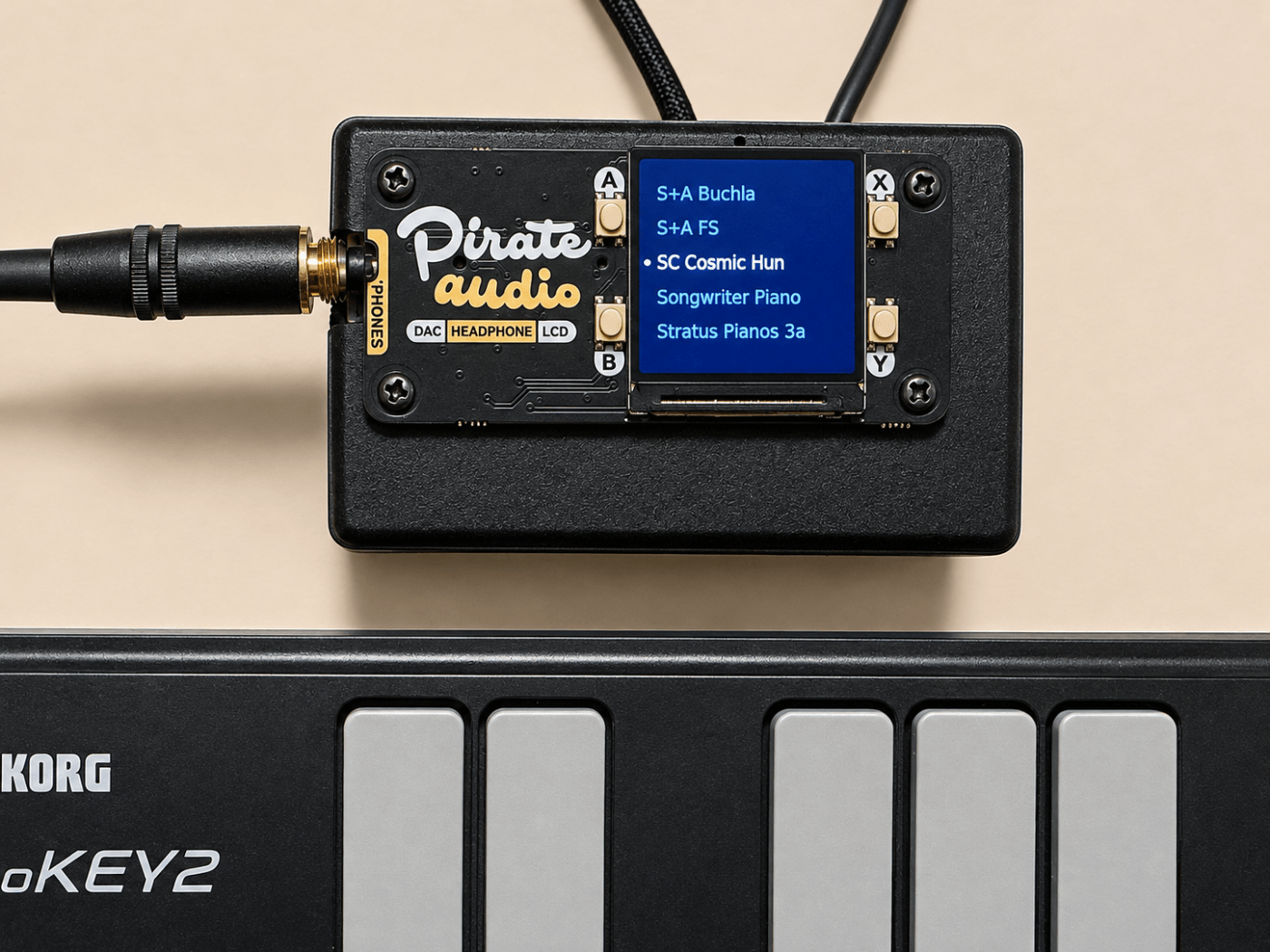
The Pirate Audio HAT display shows five patch names at a time. Buttons A and B let you navigate through the list, Y loads a patch, and X marks favorites. Favorites also appear at the top of the list. The cursor is shown in light gray, while the currently loaded patch is displayed in white.
Requirements
You’ll need:
- Raspberry Pi Zero 2 W with a microSD card
- Pirate Audio HAT with display and buttons
- Suitable power supply
- USB-MIDI keyboard
- USB data cable and, if necessary, an OTG adapter
- Wi-Fi and internet access for setup
Connect the MIDI keyboard to the Raspberry Pi’s USB port and the power supply to PWR IN. Make sure you’re using a USB cable that supports data transfer, not just charging.
Installation
First, use the Raspberry Pi Imager to flash Raspberry Pi OS Lite (64-bit) onto the microSD card. The operating system is also available from the Raspberry Pi website and can be selected in the Imager using “Use custom”.
Configure Wi-Fi, SSH, a username, and a password directly in the Imager. In this example, the username is rp and the Raspberry Pi’s hostname is rpz2.
After the first boot, download the latest version, pirate-sampler-0.2.1.zip, and save it to the Downloads folder on your Mac.
Open Terminal on your Mac and run:
cd ~/Downloads
unzip pirate-sampler-0.2.1.zip
scp -r pirate-sampler-0.2.1 rp@rpz2.local:~/
ssh rp@rpz2.local
Then, on the Raspberry Pi:
cd ~/pirate-sampler-0.2.1
bash install.sh
sudo reboot
The installer sets up the required dependencies, audio output, display, and automatic startup. The installation folder should not be moved afterward.
After rebooting, the web interface will be available on your local network at:
The username is sampler. An automatically generated password is displayed during installation and can be retrieved at any time on the Raspberry Pi:
cat ~/pirate-sampler-0.2.1/web-password.txtCode language: JavaScript (javascript)The web interface is intended for use on a trusted local network.
Creating Your Own Patches
New instruments can be created directly through the web interface using New patch. Simply enter a name and upload the corresponding WAV or AIFF files together.
Pirate Sampler automatically detects the root notes from the filenames. For example:
Cells Bass Drone_C1.wav
Cells Bass Drone_C2.wav
Cells Bass Drone_C3.wavCode language: CSS (css)
Filenames containing additional information are also supported, including those from Logic sample libraries:
RIST Piano-C1-V87-KLNC.aif
RIST Piano-C2-V87-B2W6.aif
RIST Piano-C3-V87-ZIZ9.aif
RIST Piano-F#1-V87-NPSH.aif
RIST Piano-F#2-V87-CNA6.aifCode language: CSS (css)
The note convention is C4 = MIDI note 60. If no sample exists for a particular note, Pirate Sampler automatically uses the nearest available sample and adjusts its pitch. As with basic sample pitching, pitch and playback duration change together.
The ADSR envelope and volume can then be adjusted through the web interface. Click Create patch to save the instrument and Load patch to activate it.
One particularly useful feature is that parameters can be adjusted and samples replaced while the software is running. Changes can be stored using Save changes.
A few test samples are included in the demo-samples/ folder.
The sustain pedal holds the envelope until the pedal is released or the audio file reaches its end. Automatic sample looping is not currently implemented.
Updating an Existing Installation
If you already have an older version of Pirate Sampler installed, there’s no need to set everything up again.
First, copy the new pirate-sampler-0.2.1 folder to the Raspberry Pi as described above.
If your existing installation is located in ~/pirate-sampler, run the following command to update it:
bash ~/pirate-sampler-0.2.1/upgrade.sh ~/pirate-samplerCode language: JavaScript (javascript)Existing patches, favorites, the web password, and previous audio settings are preserved. The maximum polyphony is set to 16 voices.
For more information about installation and configuration, check the included README.
Conclusion
Pirate Sampler started out as a way to create a simple, compact multisampler that doesn’t require complicated file management. Upload samples, adjust the ADSR envelope, select a patch, and start playing.
What I particularly like is being able to tweak instruments through a browser while the sampler is running. Combined with AIFF support, this is a significant improvement over my previous setup, especially for my workflow with Logic Pro.
The software was developed with the help of AI and is still a work in progress. The current version is 0.2.1.